Product case study
NexaFetch Studio
A production-ready desktop media downloader for Windows and Linux with exact-resolution downloads, audio extraction, playlists, subtitles, thumbnails, metadata, pause and resume, and advanced yt-dlp controls.
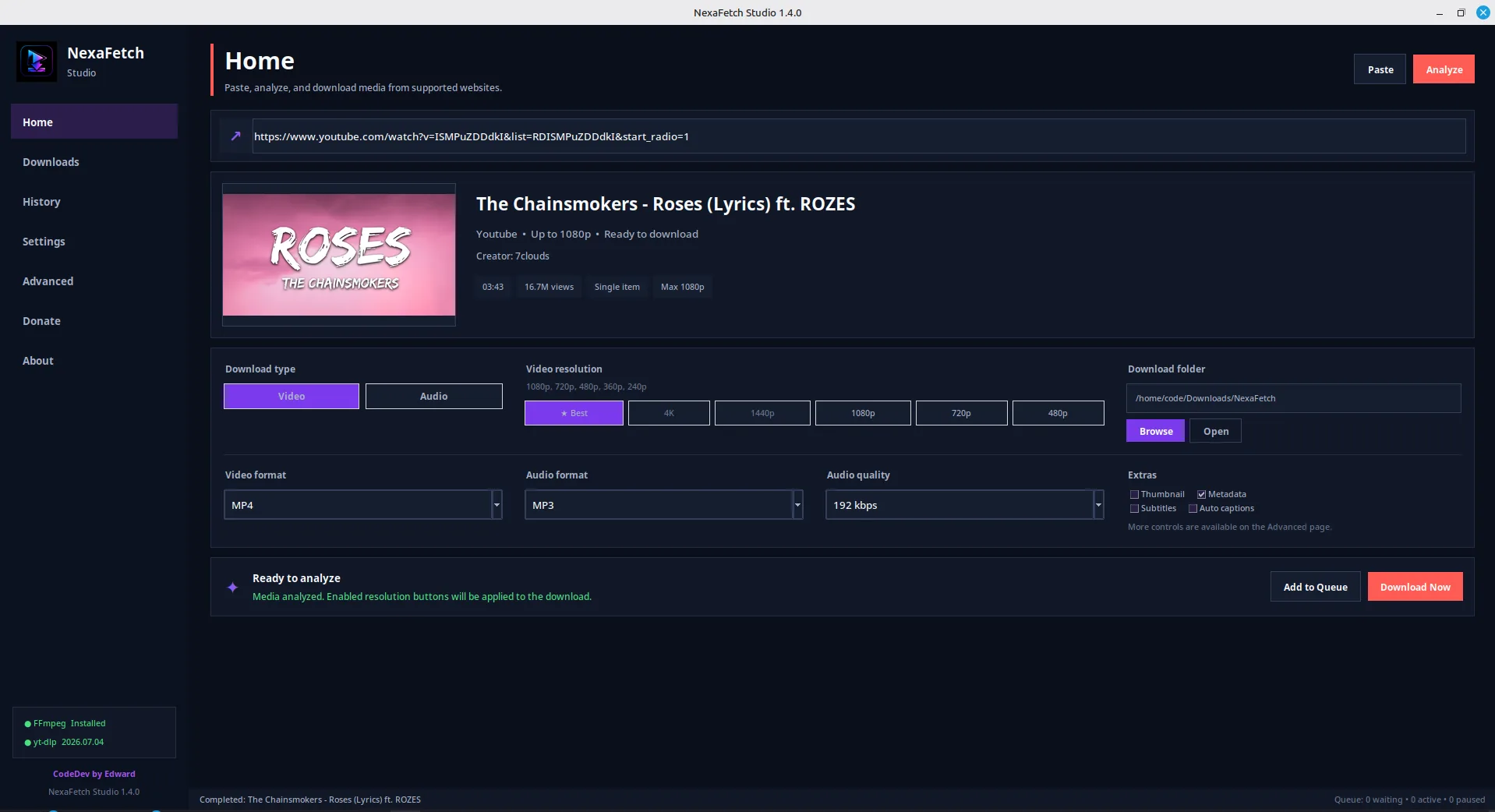
Core capabilities
Key features built into NexaFetch Studio
Exact 480p, 720p, 1080p, 1440p, and 4K resolution selection
Video and audio downloading powered by the yt-dlp Python library
MP3, M4A, AAC, FLAC, WAV, and Opus audio extraction
Pause, resume, cancel, retry, and interrupted-download continuation
Persistent download queue and searchable download history
Playlist downloading with selected-item and range controls
Thumbnail downloading, conversion, and media cover embedding
Subtitle and automatic-caption downloading with language selection
Metadata, chapter markers, descriptions, and information JSON support
Optional SponsorBlock segment marking or removal
Configurable performance profiles and optional aria2 acceleration
Professional Windows installer and native Linux Debian package
Project overview
What this project delivers
NexaFetch Studio is a production-ready desktop media downloader created by CodeDev by Edward for Windows and Linux. It provides a modern and user-friendly interface for downloading video, audio, playlists, thumbnails, subtitles, chapters, and metadata from websites supported by yt-dlp.
The application allows users to analyze a media link before downloading and select an exact video resolution such as 480p, 720p, 1080p, 1440p, or 4K when available. It combines yt-dlp with FFmpeg to merge separate video and audio streams, convert audio formats, embed subtitles and thumbnails, preserve metadata, split videos by chapters, and verify the final downloaded resolution.
NexaFetch Studio also includes a persistent download queue, pause and resume controls, interrupted-download continuation, download history, configurable performance profiles, browser-cookie support, SponsorBlock options, playlist selection, duplicate-download prevention, and advanced media-processing settings.
The project was packaged as a real desktop application rather than a portable script. Windows releases use a professional installer with application shortcuts and uninstall support, while Linux releases use a native Debian package with application-menu integration. Settings, logs, queues, caches, and history are stored in the appropriate user application-data directories.
NexaFetch Studio was designed to make the capabilities of yt-dlp accessible to users who prefer a visual desktop interface instead of terminal commands.
The challenge
Problem & constraints
Most powerful media-download tools are designed for command-line users and require knowledge of format identifiers, terminal commands, FFmpeg configuration, subtitle options, and output templates. New users can find these tools difficult to configure, while simple graphical downloaders often provide limited format control, weak error reporting, no reliable queue management, and no support for advanced yt-dlp features.
The main challenge was to create an approachable desktop interface without removing the flexibility and technical capabilities provided by yt-dlp. The application also needed to work properly on both Windows and Linux, preserve incomplete downloads, apply the selected resolution to the actual output, and behave like installed production software rather than a basic Python script.
The solution
Approach & process
I started by separating the application into interface, download-engine, configuration, history, and utility components. The original single-page interface was redesigned into a structured desktop application with Home, Downloads, History, Advanced, Settings, Donate, and About sections.
The downloader was integrated directly with the Python yt_dlp.YoutubeDL API. Resolution presets were mapped to strict format selectors so that selecting a resolution genuinely affects the downloaded result. FFmpeg and FFprobe were added for merging streams, processing media, and verifying the final output.
I then implemented a persistent queue, partial-file continuation, pause and resume controls, download history, thumbnail previews, playlist support, subtitle options, metadata tools, chapter processing, browser-cookie authentication, SponsorBlock integration, and configurable performance profiles.
The interface was refined into a modern dark enterprise design with clear visual hierarchy, reusable components, responsive layouts, status indicators, and simplified controls for common tasks. Advanced functionality was moved to a separate page to keep the primary workflow understandable.
For production distribution, the project was configured with PyInstaller, a Windows Inno Setup installer, and a native Linux Debian package. Application data was moved to platform-appropriate user directories to avoid permission problems during installation, upgrades, and normal use.
Results and impact
What changed after launch
NexaFetch Studio transformed a command-line media-downloading workflow into a complete cross-platform desktop product. Users can analyze a link, choose a real output resolution, configure additional media options, and manage downloads without manually writing yt-dlp commands.
The finished application provides:
- A more accessible workflow for non-technical users
- Reliable downloading with queue recovery and partial-file continuation
- Greater control over video quality, audio formats, subtitles, and metadata
- Faster downloads through configurable concurrency and optional aria2 support
- Native installation and uninstall behavior on Windows and Linux
- A maintainable structure that can support future yt-dlp capabilities
- Consistent branding under CodeDev by Edward
The project demonstrates desktop UI/UX design, Python application development, background task management, external-tool integration, media processing, cross-platform packaging, installer creation, and production-oriented software architecture.